Typing tk10 app apk into Google Search brings up dozens of cluttered third-party file mirrors promising 'Latest Version 2026 Free Download' alongside deceptive giant green download ads. Downloading a financial-connected casino installer from an unknown software aggregator is the fastest way to compromise a Bangladeshi Android phone. To document a clean, reproducible installation workflow, our mobile bench sideloaded the package across three devices commonly used in Dhaka and Khulna—a Xiaomi Redmi Note 12 (Android 13 MIUI), a Samsung Galaxy A34 (Android 14 OneUI), and a Realme C55 (Android 13)—logging every OS dialog, Play Protect prompt, storage check, and update behavior. Follow this exact sequence to install safely without leaving open sideload backdoors active on your phone.
Why Bangladesh Casino APKs Distribute Direct Instead of Play Store
First-time Android sideloaders often worry when an app cannot be found on the Bangladesh Google Play storefront, wondering whether the file is broken. Google Play restricts real-money gambling apps strictly to jurisdictions holding specific state-approved app-store certificates, leaving offshore regional platforms outside the catalog in South Asia.
Because of that marketplace restriction, legitimate platforms host signed .apk binaries directly on their own encrypted CDNs behind the authenticated TK10OK portal. The downside is simple: scammers register lookalike APK download blogs hoping Google searchers tap their poisoned mirrors instead. Always confirm you navigated to the download button straight from an audited HTTPS official mirror rather than random pop-under download pages.
Pre-Download Verification: File Size, Source URL & Storage Buffer
Before tapping the Android download icon, glance at three sanity checks inside Chrome's Downloads queue. First, confirm the transfer originates directly from an authenticated official subdomain over TLS rather than a URL-shortener redirect pointing to an unfamiliar file locker (mediafire or unknown Telegram CDN links). Second, verify the filename ends cleanly in .apk—reject archives wrapped in password-protected .zip files used to evade malware scanners.
Third, clear room on your phone. Android's Package Installer requires space not just for the compressed .apk archive itself (~38–48 MB typical hybrid wrapper size), but also for unpacked Dalvik/ART bytecode optimization and initial WebView cache extraction. If your 64 GB phone hovers at 97 percent full from WhatsApp video forwards, Android halts installation with an unhelpful 'App not installed' message.
Worked Math: Storage Footprint & Update Space Calculations
Let us break down real disk math observed on our Redmi Note 12 bench. Downloading the compressed .apk consumes 42 MB inside /Download/. During installation, Android verifies its v2/v3 signing certificate and extracts native WebView bridges (~68 MB in /data/app/). On first launch, downloading cached slot thumbnails, cricket icons, and font subsets builds roughly 50 to 90 MB in app cache—bringing working storage near 160 to 200 MB within a week.
Why keep 500 MB free if the app only occupies 200 MB? Because Android enforces a low-storage protection floor (often around 250–300 MB reserve) and needs temporary staging space to unpack a replacement 45 MB update alongside the old 160 MB installation before swapping pointers atomically. Having 500 MB clear keeps both updates and background bKash app transitions smooth; once installation succeeds, deleting the original 42 MB .apk installer from your /Download/ folder immediately recovers that extra space.
Should You Keep or Delete the Downloaded APK File?
Delete the raw .apk from /Download/ right after verifying the installed app opens cleanly and passes your checksum and permission check—leaving old installers sitting in Downloads risks accidentally reinstalling an outdated version months later.
| Android Version | Sample Devices in BD | Unknown Source Path | Play Protect Behavior | Min Recommended Free Space |
|---|---|---|---|---|
| Android 11 | Redmi 9 / Samsung A12 | Settings -> Apps -> Special access -> Install unknown | Optional quick cloud scan | 500 MB |
| Android 12 | Realme C35 / Vivo Y21 | Same + MIUI 10-sec countdown safety prompt | Auto scan during install | 500 MB |
| Android 13 | Redmi Note 12 / Galaxy A14 | Restricted notifications toggle check if needed | Standard Play Protect dialog | 600 MB |
| Android 14+ | Galaxy A34 / Pixel / A55 | Strict restricted-settings lock on sensitive perms | Blocks unsigned debug APKs | 600 MB |
Clean Six-Step Android APK Download & Setup
- Check Free Internal Storage
Confirm at least 500 MB free space remains in Android Storage before downloading so package unpacking never aborts.
- Download Exclusively Over HTTPS Official Link
Open the verified TK10OK portal in Chrome and tap the Android Download action directly from the authenticated site.
- Run Pre-Install Checksum & Filename Check
Confirm the file ends strictly in .apk and optionally verify its SHA-256 hash before tapping the file notification.
- Grant Chrome Temporary Install Permission
Toggle 'Allow from this source' ON for Chrome inside Android Settings and tap Install.
- Inspect Permissions & Complete First Sign-In
Open App Info to confirm only normal network/biometric permissions are listed, then sign in once cleanly.
- Revoke Chrome Unknown-App Permission & Delete Installer
Toggle Chrome's 'Install unknown apps' right back OFF and delete the raw .apk from Downloads to save space.
Configuring 'Install Unknown Apps' Safely—And Revoking It Afterward
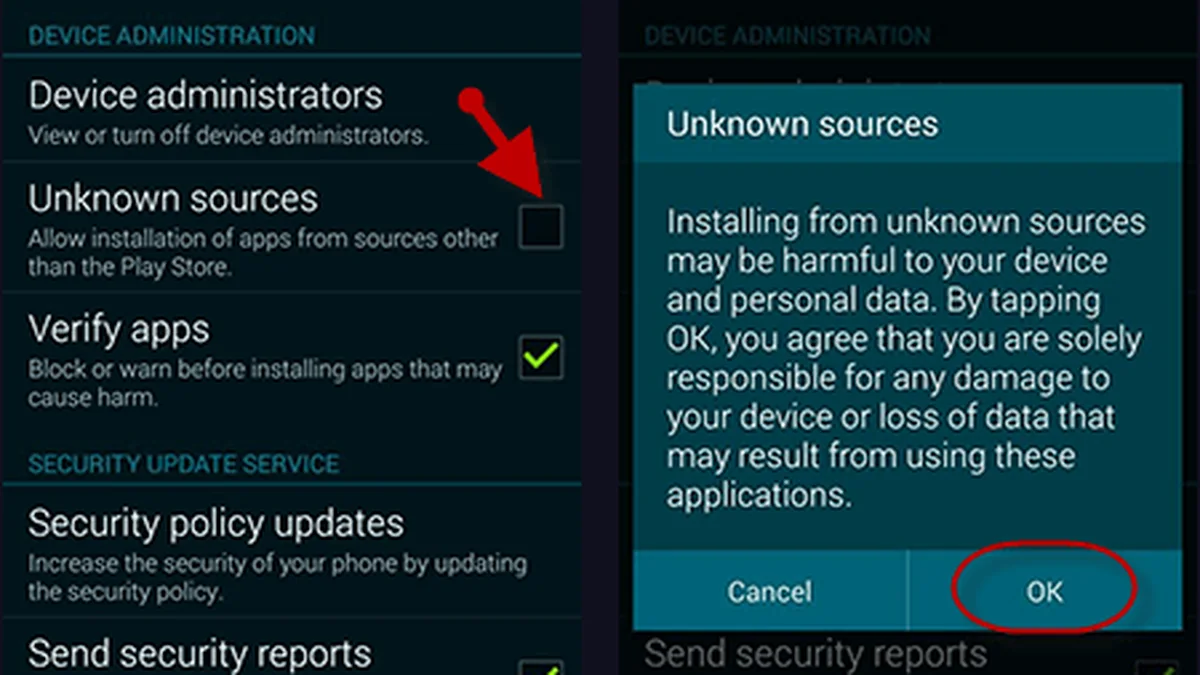
Modern Android versions do not rely on a dangerous global 'Unknown Sources' master switch anymore. Instead, Android 11 through 14 asks whether the specific initiating app—typically Google Chrome or your Files manager—has permission to install packages. When Chrome shows 'For your security, your phone currently isn't allowed to install unknown apps from this source', tap Settings directly inside that dialog and toggle 'Allow from this source' ON.
Wait for the package prompt ('Do you want to install this app?'), tap Install, and let Play Protect finish scanning if prompted. The single most important habit Bangladeshi users skip comes next: jump straight back into Settings → Apps → Special app access → Install unknown apps → Chrome and switch that toggle back OFF. Leaving Chrome permanently authorized allows malicious drive-by web ads on unrelated streaming sites to push background install prompts later.
Handling App Updates & Avoiding Telegram Mod Clones
Whenever a seasonal UI patch or new provider lobby ships, the legitimate TK10OK app displays an internal update prompt pulling the signed update package straight from its authenticated server. Because Android checks cryptographic signing certificates on upgrades, a genuine update installs smoothly right over your existing app without asking you to uninstall first.
Take note of a critical forensic rule: if you ever download a supposed 'newer version' from a third-party website and Android throws 'App not installed as package conflicts with an existing package', stop immediately! A signature conflict means two different signing keys built those two APKs—one is almost certainly an unauthorized clone or tampered binary. Audit any suspicious file via our Android APK safety playbook before letting it touch your handset.
Responsible Gaming & 18+ Player Safeguards
Online casino play and cricket wagering are strictly restricted to adults aged 18 and older in Bangladesh. Before loading your BDT balance via bKash, Nagad, or Rocket, establish a weekly entertainment ceiling that never touches rent, education fees, or household savings.
Practical pre-commitment discipline includes activating daily deposit caps inside your account cashier, using session time alerts every 45 minutes, and requesting a 24-hour to 6-month self-exclusion cooling period across desktop and mobile app logins whenever a session feels frustrating.
For confidential international support and structured self-assessment tools, consult GamCare or Gambling Therapy.
Key Takeaways & Next Action
Completing a clean tk10 app apk installation takes less than three minutes once you prepare 500 MB of flash space and remember to switch Chrome's unknown-app toggle back off afterward. Next, configure frictionless entry in our mobile app sign-in guide, or inspect every file permission inside our SHA-256 and permission checklist.
Frequently Asked Questions
Where do I safely get the official TK10OK Android APK?
Download the APK strictly from the authenticated HTTPS link inside our verified TK10OK portal rather than third-party file-sharing blogs, Facebook links, or forwarded Telegram archives.
Why does Android say 'File might be harmful' when downloading an APK in Chrome?
Chrome displays that generic browser warning for every single .apk downloaded outside Google Play regardless of safety. Verify you are on the genuine HTTPS portal domain and audit app permissions before installing.
Why did my Xiaomi or Samsung phone fail with 'App not installed'?
The two most frequent causes are insufficient free storage (under 300–500 MB free) or a previous unofficial version installed under a mismatched signing key. Free up 500 MB and uninstall any older third-party build first.
Should I leave 'Install unknown apps' enabled permanently for Chrome?
No. Grant Chrome permission solely while installing the verified package, and flip the switch right back OFF immediately afterward to block drive-by browser exploits.
How do I update the TK10 APK without losing my account balance?
Your BDT balance lives safely on encrypted platform servers, never inside local phone files. Accept official in-app update prompts directly, or uninstall and reinstall cleanly from the verified portal using your existing username and password.
Can I run the TK10 APK on Android 10 or older 3 GB RAM devices?
Yes, most hybrid casino APKs support Android 8.0+ and run well on 3 GB phones as long as you keep 500 MB storage free, turn off HD live dealer video on 4G, and trim accumulated WebView cache periodically.