Bangladeshi iPhone and iPad owners often hit a confusing dead end when searching for mobile casino apps. Android users talk nonstop about .apk downloads, while searching the Bangladesh Apple App Store returns zero real-money local platforms—leading some iPhone players toward obscure tutorial pages telling them to trust unknown 'Enterprise Developer Profiles' inside iOS Device Management. In reality, trusting an unverified enterprise profile gives an unknown third party elevated trust permissions on your iPhone while guaranteeing sudden app crashes the day Apple revokes that certificate. Our mobile compliance analyst tested the clean alternative on an iPhone 13 (iOS 17.6) and iPhone 15 (iOS 18): deploying an ios casino web app bangladesh shortcut straight through Apple Safari's native Progressive Web App (PWA) engine.
Why iOS Never Uses Android APKs (And Enterprise Profile Risks)
First, clear up the file format boundary: .apk packages belong strictly to Android's Linux/ART architecture and sit inert as useless files inside iPhone Downloads. Apple compiles apps as .ipa archives verified cryptographically by Apple's App Store servers unless provisioned specifically for corporate internal employees under an Enterprise Developer Certificate.
Whenever a random website instructs Bangladeshi iPhone users to go to Settings → General → VPN & Device Management → Trust Enterprise App, stop and reflect on what that switch represents. Enterprise certificates are constantly abused to bypass App Store screening, often bundled alongside aggressive web trackers or data-harvesting SDKs—and Apple routinely invalidates abused certificates without warning, locking users out of their app icon overnight. Native Safari PWAs never touch Device Management at all.
How Safari Progressive Web Apps Deliver Native Full-Screen Speed
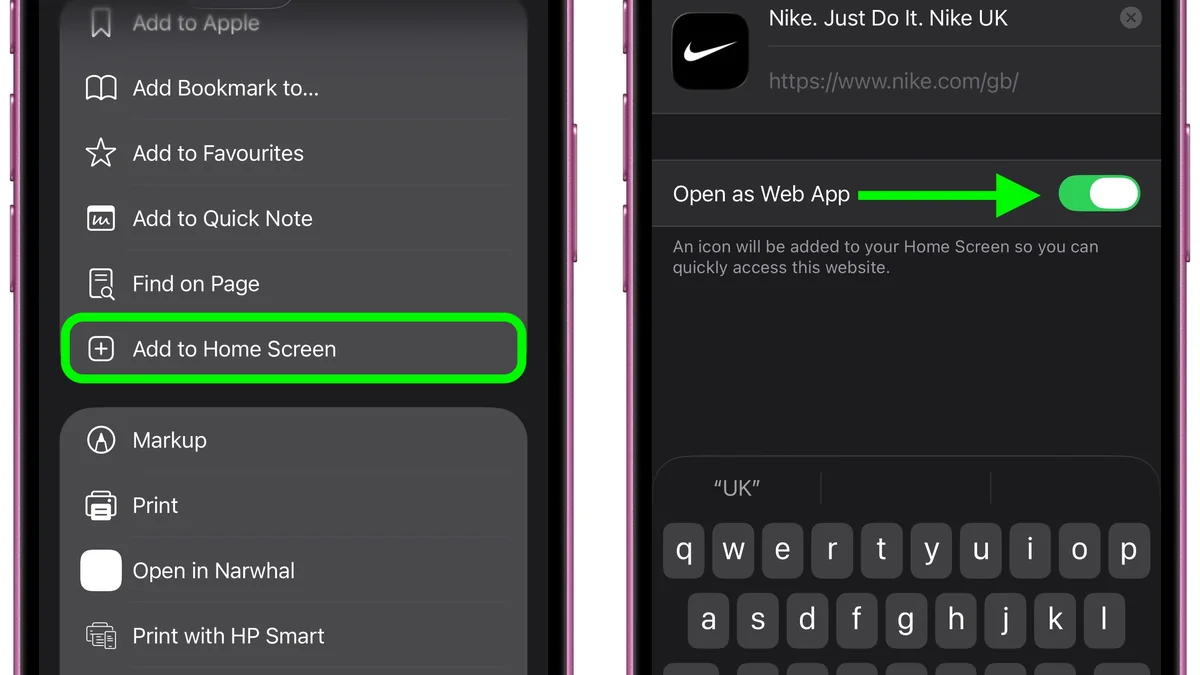
Apple has steadily upgraded WebKit PWA capabilities across iOS 16.4, 17, and 18. When you open a verified TK10OK portal route in Safari (note: you must use Safari, because Chrome for iOS uses restricted WebKit wrappers lacking full Home Screen standalone flags) and tap Share → Add to Home Screen, iOS places a clean crisp icon onto your grid.
Launching that icon opens TK10OK inside an isolated standalone WebView window without Safari's top URL bar or bottom tab switcher eating valuable space. It sits comfortably inside Apple's native security sandbox, carries its own card inside the iPhone App Switcher (making swaps over to the bKash or Nagad iOS app effortless), and updates silently whenever platform engineers ship new JILI slots or live cricket markets.
Apple Keychain & Face ID Autofill Integration
Because the standalone Web App ties straight into Safari's trusted domain store, Face ID and Touch ID populate your saved TK10OK username and randomized password in under a second—eliminating manual typing errors without touching third-party keyboards.
Worked Math: Reclaiming Screen Area & Memory Footprint on iPhone
Look at exact pixel math measured on a 6.1-inch iPhone display (2532 x 1170 hardware / 844 x 390 logical CSS points). Inside standard mobile Safari, the bottom address bar, tab controls, and top status safe area chew through roughly 112 vertical CSS points when scrolling—leaving about 675 points for actual casino tables and bet slips.
Launch the identical page as a Safari Home Screen PWA and those 112 points of Safari toolbar vanish completely, restoring roughly 14 percent more usable vertical screen real estate! That extra space keeps the entire Crazy Time wheel AND the bottom BDT chip betting rail simultaneously visible on screen without clumsy pinch-scrolling. Better still, disk footprint sits under 6 MB of cached WebKit manifest data versus 160–220 MB for typical sideloaded Android binaries.
| iOS Access Option | Apple Sandbox Security | Full-Screen Mode | Revocation Risk | bKash / Nagad App Switch |
|---|---|---|---|---|
| Safari Add to Home Screen (PWA) | Maximum (Native WebKit) | Yes (Standalone full screen) | Zero (Never expires) | Smooth App Switcher card |
| Standard Mobile Safari Tab | Maximum (Native WebKit) | Partial (Address bar stays) | Zero | Smooth (Avoid Private tab) |
| Chrome / Edge on iOS | High (Uses iOS WebKit) | No (Cannot add clean PWA) | Zero | Good, lacks PWA launcher |
| Untrusted Enterprise .ipa Profile | Low (Third-party dev cert) | Yes | High (Apple revokes keys) | Risky on MFS-linked iPhones |
How to Install the TK10OK iOS Safari PWA in 45 Seconds
- Open Verified Portal Strictly in Apple Safari
Launch Apple's built-in Safari browser (not Chrome or in-app Facebook browsers) and load the authenticated TK10OK portal URL.
- Verify Normal Non-Private Browsing Mode
Ensure the bottom Safari tab bar appears white/light rather than dark Private mode so cookies and Face ID autofill work.
- Tap the Bottom Share Button
Tap the square icon with an upward arrow centered along the bottom Safari toolbar (top-right on iPad).
- Select 'Add to Home Screen'
Scroll down the Share sheet options, tap 'Add to Home Screen', confirm the clean title 'TK10OK', and tap Add.
- Launch From Home Screen & Enable Face ID Autofill
Tap the new TK10OK icon on your iPhone Home Screen and log in once using Safari iCloud Keychain Face ID autofill.
Tuning iOS Safari Settings: Pop-Ups, Cross-App MFS & Cookies
Most iPhones work smoothly straight out of the box, yet two Safari toggles occasionally trip up Bangladeshi deposits inside bKash or Nagad payment iframes. If you previously flipped Settings → Safari → Block All Cookies ON, neither the portal login token nor cashier order session can persist across screens—keep 'Block All Cookies' OFF.
Similarly, if a cashier payment gateway opens an external confirmation popup window (such as bKash checkout verification) and nothing loads, inspect Block Pop-ups temporarily inside Safari Settings or check whether an iOS Content Blocker extension (like aggressive ad-blockers) is filtering payment redirect scripts. Also avoid Private Browsing tabs inside Safari when creating your Home Screen shortcut or performing deposits; Private tabs reset local storage immediately upon background suspension.
Fixing Blank Screens, Audio Mute & Haptic Issues on iPhone Live Tables
Two tiny iOS habits baffle new iPhone casino players every week. First, flipping the physical Ring/Silent switch on the left side of an iPhone (or Action Button Silent toggle on iPhone 15 Pro) silences WebGL slot reels and live roulette audio even when media volume is turned halfway up! Flipping off Silent Mode—or adjusting live game audio explicitly after tapping the screen once—restores full sound cleanly.
Second, if an iOS PWA ever displays a frozen loading spinner after a major platform design update, swipe the Home Screen PWA card completely up and away in the iPhone App Switcher to force a cold restart, or clear just that single domain under Settings → Safari → Advanced → Website Data and re-add the bookmark cleanly. Pair your iPhone setup with 4G stream scaling whenever traveling outside home Wi-Fi.
Responsible Gaming & 18+ Player Safeguards
Online casino play and cricket wagering are strictly restricted to adults aged 18 and older in Bangladesh. Before loading your BDT balance via bKash, Nagad, or Rocket, establish a weekly entertainment ceiling that never touches rent, education fees, or household savings.
Practical pre-commitment discipline includes activating daily deposit caps inside your account cashier, using session time alerts every 45 minutes, and requesting a 24-hour to 6-month self-exclusion cooling period across desktop and mobile app logins whenever a session feels frustrating.
For confidential international support and structured self-assessment tools, consult GamCare or Gambling Therapy.
Key Takeaways & Next Action
Setting up an ios casino web app bangladesh shortcut through Safari's native Add to Home Screen captures everything iPhone players want—full-screen slot and live-dealer geometry, Face ID Keychain sign-in, and zero storage bloat—while avoiding every enterprise certificate risk. Finish hardening your login via our official mirror TLS check or inspect bKash withdrawal limits before playing.
Frequently Asked Questions
Can I download a TK10OK APK file onto my iPhone or iPad?
No. APK installers are built strictly for Android operating systems and will not execute on iOS. iPhone and iPad players should install TK10OK safely via Safari's Add to Home Screen Progressive Web App feature.
Why isn't the 'Add to Home Screen' option working properly inside Chrome on iPhone?
On older iOS setups, Safari owns full standalone Home Screen PWA provisioning. Open the verified TK10OK URL directly in Apple's native Safari browser, tap Share, and select Add to Home Screen.
Is it safe to install an iOS casino app using 'Trust Enterprise Developer' settings?
We advise strongly against it. Enterprise developer profiles bypass App Store vetting, often get revoked abruptly by Apple (locking you out of the icon), and introduce unnecessary security risk on phones holding bKash or Nagad apps.
Why do I get no sound on Evolution live roulette inside my iPhone PWA?
Check the physical Silent Mode switch on the side of your iPhone (or Control Center Silent toggle), and tap once inside the live studio video canvas so Safari WebKit permits active media audio.
How do I update or refresh the iPhone web app if a page gets stuck loading?
Swipe up from the bottom to open the iPhone App Switcher and flick the TK10OK PWA card upward to close it completely. If issues persist, clear that domain's cache under Settings -> Safari -> Advanced -> Website Data.
Does Face ID autofill work inside the Safari Home Screen web app?
Yes. Because Safari PWAs link cleanly to Apple's iCloud Keychain on iOS 16–18, Face ID populates your saved login credentials automatically with zero manual typing.